
Definition
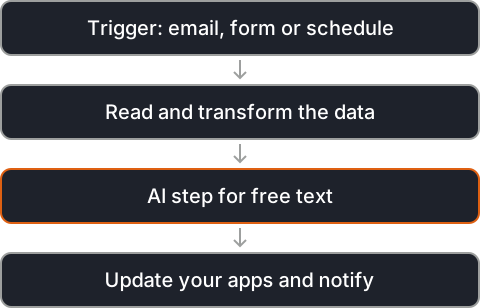
Workflow automation connects the apps a team already uses so that repetitive steps run on their own. A trigger starts the flow, such as a new email, a form entry or a schedule. The data is then read, changed and sent to the next app.
AI steps are added where a rule is not enough, for example to read a free-text email, pull out the fields that matter or decide which team should handle it.
Because each step is visible in a flow, a team can see what happens to every item, change a step without rewriting everything, and add new apps as the business grows. Most flows start small, with one task that repeats often, and grow from there.
Applications
- Entering invoice and receipt data into accounting.
- Sorting incoming emails and form submissions.
- Routing new leads to the right person in the CRM.
- Scheduled reports and reminders.
- Notifications when something needs attention.
Well-known tools
Tools that are widely used for this kind of work, given as examples from the field. The right choice depends on your data, your systems and where the solution has to run.
- n8n: a workflow automation tool that can be self-hosted and has AI steps.
- Zapier: a no-code service that connects a large catalogue of apps.
- Activepieces: an open-source, no-code automation tool.
- Node-RED: an open-source, flow-based tool for wiring APIs and services together.
Real-world problems
Hours of copy and paste
The same small tasks repeat every day and quietly take up a large part of the week, time that could go to work that needs a person.
Tasks forgotten
When the person who usually does a task is away, it waits. An automated flow runs whoever is in the office.
Typing errors
Retyping data by hand brings mistakes. Moving it between apps automatically keeps it the same everywhere.
Fragile chains
Flows break when an app changes. Good automations check their input and alert someone when a step fails.