
Definition
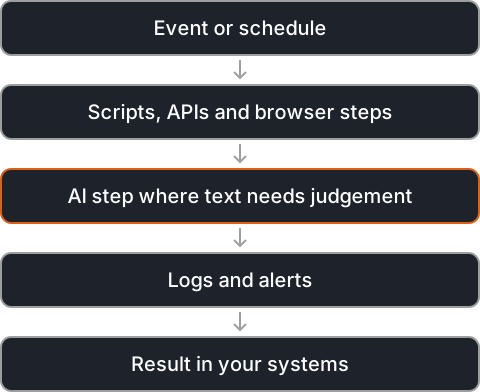
A custom automation system is built around one exact process when ready-made connectors are not enough. It combines scripts, APIs, queues, schedules and browser automation, with AI steps where text needs judgement.
It runs as a service of its own, with logs, retries and alerts, so failures are seen and handled instead of going unnoticed.
A custom system takes more effort to build than a no-code flow, but it can follow the process exactly, handle unusual cases and grow with the volume. It also belongs to you: the code can be read, tested, versioned and changed like any other software.
Applications
- Working with old systems that have no API, through browser automation.
- Reconciling records across several systems.
- Document pipelines: receive, read, check and file.
- Back-office processes from start to finish.
Well-known tools
Tools that are widely used for this kind of work, given as examples from the field. The right choice depends on your data, your systems and where the solution has to run.


- Python: a common language for scripts and data work.
- Playwright: browser automation for sites without an API.
- Temporal: durable workflows that survive crashes and retries.
- Apache Airflow: scheduling and monitoring of data pipelines.
- Docker: packaging services so they run the same everywhere.
Real-world problems
Tools that do not talk
A process spans several systems and people move data between them by hand, checking and retyping as they go.
No API
An older system can only be used through its screens. Browser automation can work it like a person would.
Silent failures
Scripts that fail quietly cause problems days later, when the cause is hard to find. Logs and alerts make every failure visible at the moment it happens.
Outgrowing no-code
As volume and rules grow, no-code flows become hard to change. Code gives room for the exact logic a process needs.